We all have thousands of photos sitting on our phones and hard drives. They capture birthdays, vacations, weddings, and those quiet, everyday moments that mean the world to us. But scrolling through a digital gallery just isn’t the same as turning the pages of a physical book.
Turning those digital memories into a tangible keepsake is a wonderful project, but choosing the right tool can be tricky. With so many options available online, how do you know which platform will give you the creative freedom and professional results you want?
This guide breaks down the essential photobook maker features you need to look for. We will help you navigate the software landscape so you can create a stunning album that preserves your memories for years to come.
Why the Right Platform Matters
Not all photobook tools are created equal. Some are designed for speed, offering simple drag-and-drop templates. Others are built for professionals, providing granular control over every pixel.
Choosing the wrong platform can lead to frustration. You might find yourself limited by rigid layouts, poor paper quality, or confusing interfaces. Understanding key photobook maker features ensures you pick a service that matches your skill level and vision.
Whether you want a simple family album or a high-end wedding portfolio, the right software makes the process enjoyable and the result beautiful.
Essential Design and Layout Features
The heart of any photobook platform is its design interface. This is where you will spend most of your time, so it needs to be intuitive and powerful.
User-Friendly Interface
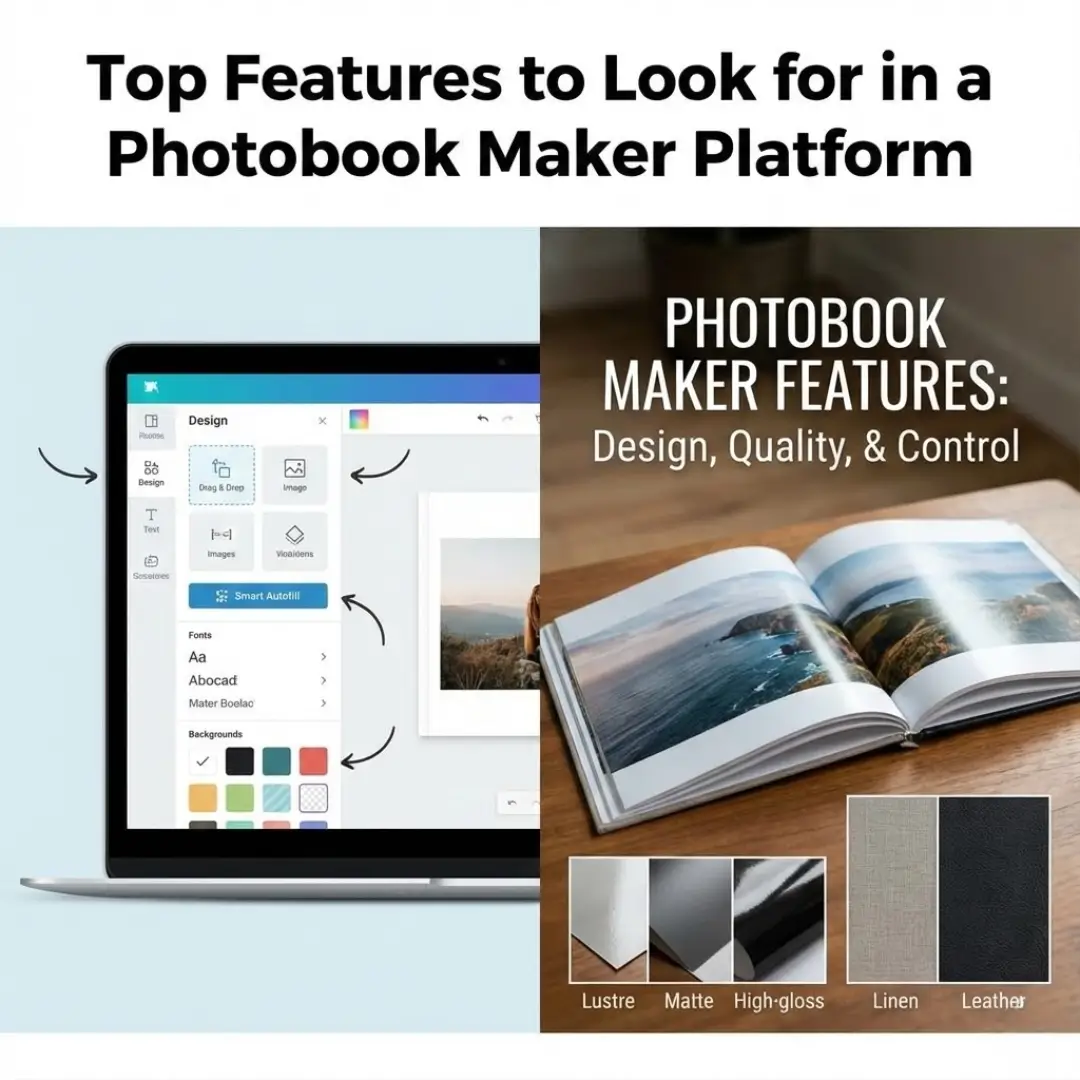
You shouldn’t need a degree in graphic design to make a photo album. The best platforms offer a clean, easy-to-navigate interface. Look for drag-and-drop functionality that makes placing photos simple.
Pro-Tip: Test the platform with a small project first. If you find yourself constantly searching for buttons or getting stuck, it might not be the right fit for a larger project.
Flexible Templates and Layouts
Templates are a huge time-saver, but they shouldn’t feel restrictive. Top-tier platforms offer a wide variety of professionally designed themes.
Crucially, you should be able to customize these templates. Look for features that allow you to:
- Resize and rotate image boxes
- Add or remove text fields
- Change background colors
- Adjust margins and spacing
If you are feeling stuck on how to arrange your images, you might want to look into how to create a modular photobook layout to keep things organized and visually appealing.
Smart Autofill Technology
If you have hundreds of photos, placing them one by one can be tedious. “Smart autofill” is a feature where the software automatically arranges your photos chronologically or by theme.
This gives you a solid starting point. You can then tweak the layout, swapping photos or changing spreads, which saves hours of initial work.
Customization and Creativity Tools
Once the basic layout is set, you’ll want to add personal touches. Advanced photobook maker features allow you to inject your unique style into the album.
Extensive Clipart and Background Libraries
Sometimes a white background is perfect, but other times you want a splash of color or a thematic element. Look for platforms with diverse libraries of backgrounds, stickers, and clipart.
Text and Typography Options
The story behind the photo is often just as important as the image itself. Robust text tools are essential. You should have access to a variety of fonts, sizes, and colors.
Check if the platform supports:
- Captions for individual photos
- Large text blocks for storytelling
- Text on the spine of the book
Adding context is vital. You can learn more about how to create storytelling photobooks to ensure your album narrates your journey effectively.
Photo Editing Capabilities
You shouldn’t have to switch between Photoshop and your browser. Good platforms include built-in editing tools.
Look for basic features like:
- Cropping and rotating
- Brightness and contrast adjustments
- Black and white or sepia filters
- Red-eye removal
Print and Material Quality
Even the most beautiful design will fall flat if the print quality is poor. When evaluating photobook maker features, pay close attention to the physical product specifications.
Paper Quality and Finish
The paper you choose affects how your photos look and feel. Standard options usually include semi-gloss or matte. Premium platforms offer upgrades like:
- Lustre: A slight sheen that resists fingerprints.
- High-Gloss: Makes colors pop and appear vibrant.
- Silk/Matte: A smooth, non-reflective finish for a modern look.
Layflat Binding
This is a game-changer for panoramic photos. Standard binding curves into the spine (the gutter), hiding parts of the image.
Layflat binding allows pages to open completely flat. This means you can spread a single stunning image across two pages without losing any detail in the middle. It creates a seamless, professional viewing experience. If you are unsure about the mechanics, check out our guide on how to design a layflat photobook.
Cover Options
The cover sets the tone for your book. Basic options usually include softcovers or printed hardcovers. For special occasions, look for premium materials like:
- Genuine leather
- Linen or fabric
- Acrylic covers
- Embossing or foil stamping
For inspiration on what makes a cover stand out, explore current photobook cover design trends.
Balancing Price and Value
Price is always a factor, but the cheapest option isn’t always the best value. When comparing costs, look at what is included.
Some platforms have a low base price but charge extra for essential features like removing the company logo or adding extra pages.
| Feature | Standard Platform | Premium Platform |
|---|---|---|
| Paper | Basic semi-gloss | Archival, thick pages |
| Binding | Glued standard binding | Layflat technology |
| Logo | Often includes barcode/logo | No branding |
| Support | Email only | Chat or phone support |
Always check for bulk discounts if you are ordering multiple copies for family members.
Finding a Reliable Platform
When searching for a service that ticks all these boxes, it helps to look for platforms that prioritize print quality alongside easy design tools. For example, TeoPrint is a solid option for creators who value professional-grade materials without the complexity of professional design software.
TeoPrint offers a robust online editor that simplifies the layout process while providing access to high-end features like layflat binding and archival paper. Their range of photobooks caters to various needs, from simple family yearbooks to luxurious wedding albums.
It is worth exploring their toolset if you want a balance of ease and quality. Plus, their focus on durability ensures your memories are preserved safely.
Conclusion
Creating a photobook is a labor of love. It’s a way to honor your memories and share them with the people who matter most. By prioritizing the right photobook maker features, you ensure that the process is smooth and the final product is beautiful.
Look for a platform that offers a user-friendly interface, flexible design tools, and high-quality printing materials. Whether you choose a versatile service like TeoPrint or another top-rated tool, the most important thing is that your photos finally make it off your screen and into your hands. If you need inspiration to get started, browse through 100 photo book ideas to spark your creativity.
Start your project today and turn those digital moments into a physical legacy.
Frequently Asked Questions (FAQ)
Q: What is the most important feature for a wedding photobook?
A: For wedding albums, layflat binding is arguably the most critical feature. It allows you to display wide, panoramic shots across two pages without a crease in the middle interrupting the image. High-quality archival paper is also essential for longevity.
Q: Can I edit photos directly in the photobook maker?
A: Yes, most modern platforms have built-in editing tools. You can typically crop, rotate, fix red-eye, and apply basic filters. However, for advanced retouching or complex color correction, it is better to use dedicated software like Lightroom or Photoshop before uploading.
Q: How do I know if the image quality is high enough for printing?
A: Most photobook maker features include a low-resolution warning. If you upload a photo that is too small or pixelated for the print size you’ve chosen, the software will usually display a yellow or red warning icon.
Q: What is the difference between a photobook and a photo album?
A: A photo album traditionally has pockets or sticky pages where you insert physical prints. A photobook has the images printed directly onto the paper, like a coffee table book. Photobooks allow for more customization in layout and design. You can also explore alternatives like a framed photo collage vs photo book to see which suits your style better.
Q: Can I collaborate with others on a photobook project?
A: Some platforms offer collaborative features where multiple users can upload photos or work on the design. If this is important for your project, check the platform’s specifications specifically for “collaboration” or “shared projects.”
Q: How long does it typically take to print and ship a photobook?
A: Production times vary by company and the complexity of the book (e.g., leather covers take longer). Generally, production takes 3-5 business days, with shipping adding another 3-7 days. Always check the estimated delivery date if you need it for a specific event.
Q: Are online photobook makers mobile-friendly?
A: Many platforms have mobile apps or responsive websites that allow you to create simple books from your phone. However, for complex designs with custom text and specific layouts, a desktop computer usually offers a better experience and more control. Before starting, it’s helpful to know how to choose photos for your photobook so you aren’t overwhelmed on a small screen.