We all do it. We scroll through our Instagram or Facebook feeds, admiring the perfectly curated grids of our favorite memories. From golden hour selfies to breathtaking travel landscapes, your social media profiles are essentially digital art galleries. But why should those memories stay trapped behind a small phone screen?
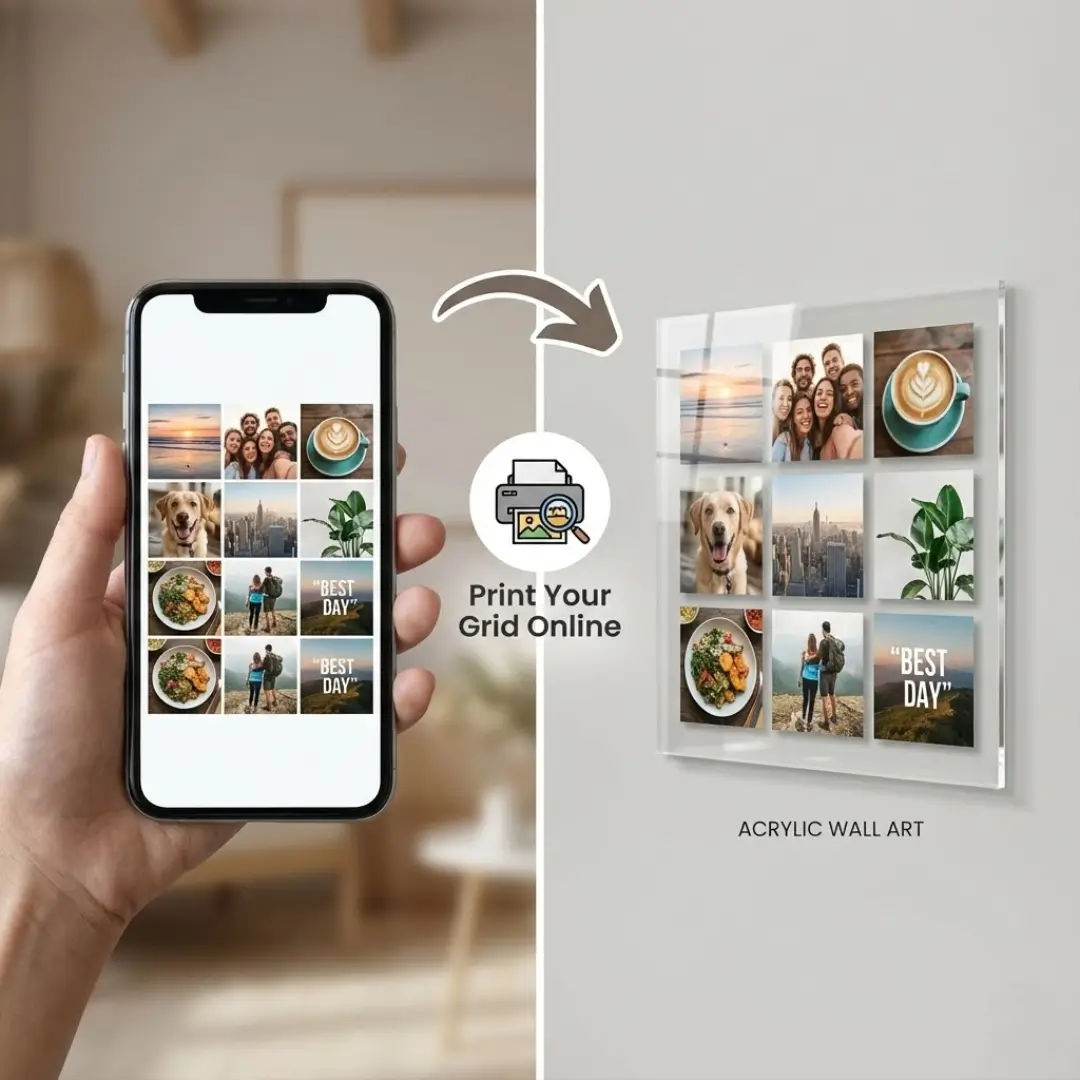
Bringing your digital “feed” into the physical world is a fantastic way to decorate your home. Specifically, an acrylic print can replicate the backlit, vibrant look of a smartphone screen better than any other material.
If you are looking to print photo collage online using your social media snaps, you’ve come to the right place. This guide will walk you through exactly how to take those square Instagram posts and Facebook memories and turn them into a stunning, high-definition acrylic display.
Why Acrylic is Perfect for Social Media Photos
When you decide to print photo collage online, the material you choose makes a huge difference. For social media images, acrylic is often the superior choice over canvas or traditional paper framing.
1. It Mimics the Screen
Your photos look best on your phone because of the backlight. Acrylic prints are face-mounted, meaning the image is printed behind a sheet of polished acrylic glass. Light refracts through the acrylic, giving the image a depth and vibrancy that looks incredibly similar to a high-definition screen.
2. The Modern Aesthetic
Social media is modern, and so is acrylic. The frameless, floating design of an acrylic print complements the contemporary style of Instagram photography. It’s sleek, clean, and minimalist.
3. Durability
Acrylic is tough. It is shatter-resistant and offers natural UV protection. This means your viral moments won’t fade over time, keeping your wall art as fresh as your timeline.
Preparing Your Social Images for Print
Before you rush to print photo collage online, there is one major hurdle to overcome: image quality. Social media platforms compress images to save space, which can result in pixelation if you try to blow them up too large.
Finding the High-Res Versions
Ideally, you shouldn’t just screenshot your Instagram post. Screenshots significantly reduce quality. instead:
- Check your Camera Roll: Try to find the original photo file on your phone or cloud backup.
- Download Your Data: Both Facebook and Instagram allow you to download an archive of your data, which often contains higher-quality versions of your uploads.
- Use Upscaling Tools: If you only have a low-res version, consider using AI image upscalers to improve the density before printing.
If you are working strictly from a mobile device, check out our guide on how to print photos from your phone to ensure you get the best possible transfer quality.
Aspect Ratios Matter
Instagram made the 1:1 square famous. When planning your collage, stick to square shapes to keep that authentic “grid” look. If you are mixing in Facebook photos, which might be portrait or landscape, you may need to crop them to maintain consistency.
Step-by-Step: How to Print Photo Collage Online
Ready to create your masterpiece? Follow these simple steps to turn your digital grid into a physical reality.
Step 1: Curate Your Theme
A great collage tells a story. Don’t just pick random images. Look for a cohesive theme in your feed.
- Color Palette: Choose photos with similar tones (e.g., all blues for a beach trip).
- Event-Based: A year in review, a wedding, or a specific vacation.
- Subject: Just photos of your pets or your culinary creations.
If you are stuck for inspiration, browse through some creative photo collage ideas to help spark your imagination.
Step 2: Choose the Right Layout
For social media photos, a “grid” layout is the most natural choice. It mimics the profile view of Instagram. However, you don’t have to be rigid. You can mix a large “hero” image with smaller supporting shots.
You can use various tools to visualize this. Check out the top 5 free online photo collage makers to experiment with different arrangements before committing to print.
Step 3: Select Your Online Printer
Not all printing services are created equal. When you look to print photo collage online, ensure the vendor specializes in acrylic. Look for:
- Direct-to-acrylic printing vs. Face mounting: Face mounting (paper printed and glued to acrylic) usually offers better sharpness than printing directly onto the plastic.
- Custom sizing: Ensure they offer sizes that fit your wall space.
- Easy uploaders: A good platform allows you to upload directly from your device.
For specific tips on material selection, read our guide on how to create a stunning photo collage for acrylic printing.
Step 4: Customize and Order
Upload your high-res images to the printer’s design tool. Drag and drop your photos into the grid slots.
- Check the bleed: Ensure no important faces are cut off at the edges.
- Add borders: A white border between images can separate the photos cleanly, enhancing the “gallery” feel.
- Review resolution: Most online tools will warn you if an image resolution is too low. Do not ignore this warning!
Displaying Your Social Media Collage
Once your beautiful acrylic print arrives, the final step is installation. Because acrylic prints often use metal standoffs (bolts in the corners), they require precise installation to look their best.
Make sure you have a level and a drill handy. For a detailed walkthrough, follow our DIY guide to hang acrylic wall art to ensure it’s secure and straight.
Pro-Tip on Lighting: Since acrylic is glossy, it reflects light. Avoid hanging your collage directly opposite a large window, as the glare might obscure your photos.
Why Not Just Use Frames?
You might be wondering if it’s easier to just print standard 4×4 photos and buy a multi-opening frame. While that is a classic option, it lacks the visual impact of a single, sleek acrylic sheet.
Frames add bulk and separate the viewer from the image with glass and bezels. An acrylic collage presents the images as a unified piece of modern art. If you are still on the fence, you can compare the two styles in our article on acrylic wall art vs framed photos.
Conclusion
Your social media feed is a curated diary of your life’s best moments. Don’t let those memories disappear into the digital abyss as you scroll past them. When you print photo collage online on acrylic, you transform fleeting posts into permanent, high-end decor.
By finding your high-quality files, choosing a grid layout, and opting for the vibrant finish of acrylic, you can enjoy your “likes” in real life, every single day.
Ready to get started? Organize digital photos for printing today and turn your timeline into a stunning wall display.
Frequently Asked Questions (FAQ)
Q: Can I print directly from Instagram to an acrylic collage?
A: While some services allow direct connection to Instagram, it is often better to use the original photo files from your phone. Instagram compresses images, which can lead to blurriness on large prints.
Q: What is the best resolution for printing a photo collage online?
A: For a sharp acrylic print, aim for at least 150-300 DPI (dots per inch) at the final print size. If your collage is large, your individual photo files should be at least 1MB to 2MB each.
Q: How much does it cost to print a photo collage on acrylic?
A: Prices vary by size and thickness of the acrylic. Small desktop blocks can start around $30-$50, while large wall art pieces can range from $100 to over $300.
Q: How do I clean my acrylic photo collage?
A: Acrylic scratches easily. Never use paper towels or glass cleaners like Windex. Use a soft, microfiber cloth and a dedicated plastic cleaner or warm soapy water.
Q: Can I create a collage with both Instagram and Facebook photos?
A: Yes! When you print photo collage online, you can upload files from multiple sources. Just be mindful of the aspect ratios—you may need to crop rectangular Facebook photos to match square Instagram ones for a uniform look.
Q: Is there an app to design the collage before printing?
A: Yes, apps like Canva, Layout from Instagram, or PicCollage allow you to design the layout first. You can then save the high-res file and design a photo collage online using that single image for printing.